
Mod: Convenient commands [1.21+]
![Mod: Convenient commands [1.21+] Minecraft PE / Bedrock [xfgiven_vers]](/uploads/posts/2026-02/1746076882_turbo-commands.jpg)
- Review
- Help/Install
-
The Turbo Commands mod for Minecraft PE (Bedrock) allows you to create your own commands and run them with a single click. It is ideal for players who are tired of manually entering commands every time they enter the world or server.
Navigation:■ Mod features Convenient commands
Features of the mod Convenient commands
With this mod, you will receive a special item that opens its own command menu in Minecraft PE (Bedrock). Inside it, you can add commands, edit them, perform multiple triggers, and change the appearance of the interface. Commands can even be executed with a delay, and the result is displayed in the chat.
Turbo Commands fully supports multiplayer. Only operators have access to the menu, but each player can customize the display of commands, colors, sorting order, and other parameters to their liking.
![]()
Features and settings
To open the menu, enter the command
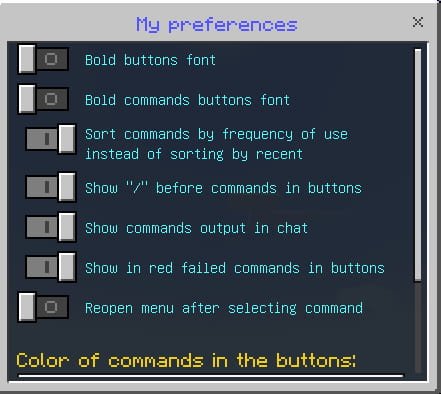
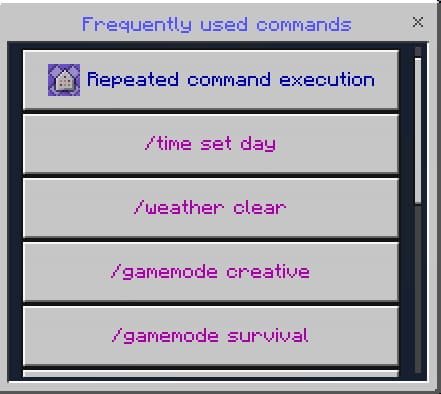
/function sirob_turbocommands, and you will receive an access item. Use it to open the interface. You can add commands, set the number of repetitions, set the delay between activations, select the sorting order, show or hide the execution result, and even select the text color.The settings are not global — each player can customize the interface individually. You can sort by frequency of use or by recent commands. There are also options to show/hide the "/" command, highlight incorrect commands, automatically reopen the menu, and much more.
![]()
Additional information
If you have lost your access item, you can find it in Creative mode in the "Construction" section. To give it to other players, use the command
/execute as Nick run function sirob_turbocommands. The add-on only works on release versions of Minecraft PE (Bedrock) and requires the "Beta API" feature to be enabled in the world settings. -
Download Mod: Convenient commands [1.21+]
[9.99 Kb (downloaded: 129)]
[121.61 Kb (downloaded: 127)]
Comments (0)
Comment