
Mod: Game Mode Switch [1.21; 26+]
![Mod: Game Mode Switch [1.21; 26+] Minecraft PE / Bedrock [xfgiven_vers]](/uploads/posts/2026-01/1765218303_gamemode-switcher.jpg)
- Review
- Help/Install
-
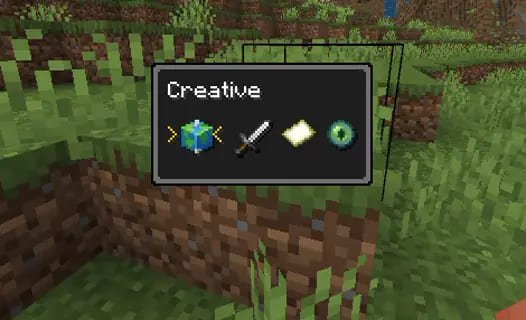
The Gamemode Switcher mod adds a functional menu to Minecraft PE (Bedrock) for changing game modes without having to type commands in chat. This add-on uses the new "Command Macros" system available in Minecraft Preview to implement quick switching between survival, creative, adventure, and spectator modes.
This mod is designed for players who want to optimize their gameplay and spend less time entering commands. The latest update features a completely redesigned user interface that makes the add-on even more intuitive to use.
Navigation:■ Mod features Game mode switch
Features of the mod Game mode switch
The main feature of the mod is the use of macros, which is a new technology for Minecraft PE (Bedrock). This allows you to assign complex actions to keys, creating the feeling of native game functionality. The switch interface is minimalistic and does not overload the screen.
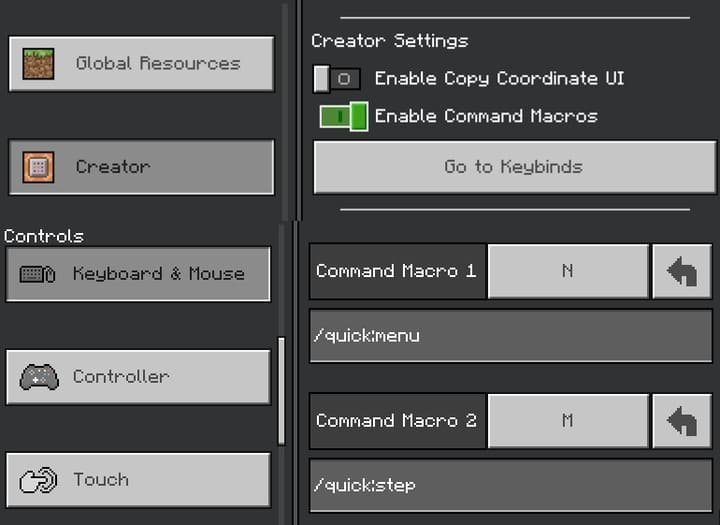
It is important to note that at the moment, the mod only works in beta versions (Preview), where the "Enable command macros" option is available in the creator settings. This is a great tool for map testers and content creators who often have to change game modes.
![]()
How to set up and use
To use the mod, you need to follow a few setup steps. First, enable "Enable command macros" in the world settings. Then bind the commands
/quick:menuand/quick:stepto keys that are convenient for you in the control settings. To open the menu, hold down the right Alt key and press the key bound to/quick:menu.To switch between modes, use the
/quick:stepkey, and to confirm your selection, press the menu button again. This process may seem complicated at first, but once you've set it up, changing modes in Minecraft PE (Bedrock) will take just a second.![]()
-
Comments (0)
Comment