
Add-on: Large Trees [26+]
![Add-on: Large Trees [26+] Minecraft PE / Bedrock [xfgiven_vers]](/uploads/posts/2026-08/1761111359_better-trees-from-saplings.jpg)
- Review
- Help/Install
-
The "Better Trees from Saplings" add-on for Minecraft PE (Bedrock) completely replaces the vanilla tree growth system, giving you full control over your forest. Using a powerful in-game interface, you can choose the exact type of tree you want to grow and watch as it is procedurally generated right before your eyes.
Navigation:■ Features of the "Big Trees" add-on
■ Endless variety and uniqueness
■ Performance and Compatibility
Features of the "Big Trees" Add-on
This add-on is designed for those who want to take control of nature and create perfect landscapes. It's ideal for survival modes, Realms worlds, and servers, since it doesn't require commands or cheats.
The main idea is to give players a simple and intuitive tool for selecting and growing exactly the tree they need, rather than relying on chance. To use this add-on, you must enable the experimental "Beta APIs" option in the Minecraft PE (Bedrock) world settings.
Intuitive Growth Management
Forget about bone meal and long waits. With this add-on, you become a true lord of the forests, controlling tree growth with a single simple action.
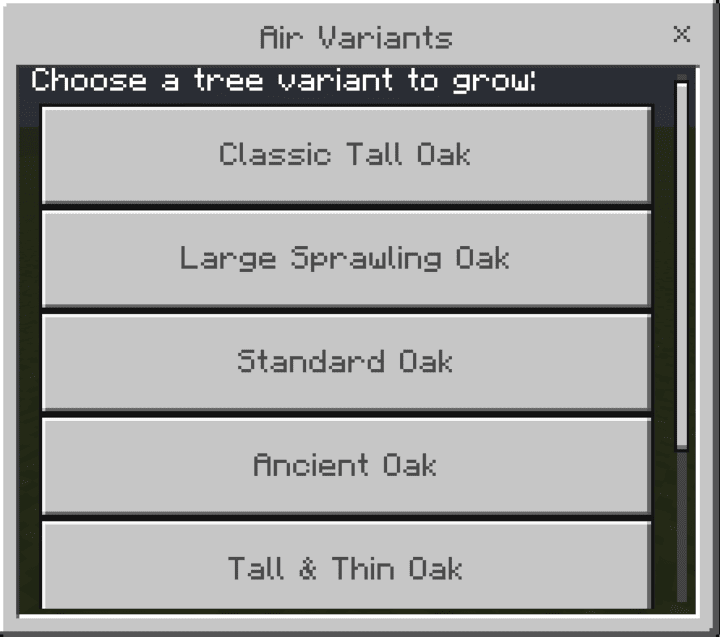
Open the selection menu
To grow a tree, simply hold down the crouch (sneak) button and place any vanilla sapling on the ground. This action will instantly open a user-friendly interface showing all available growth options for that type of sapling, whether it’s an oak, a cherry, or even a mangrove sapling in Minecraft PE (Bedrock).
![]()
Real-Time Growth Process
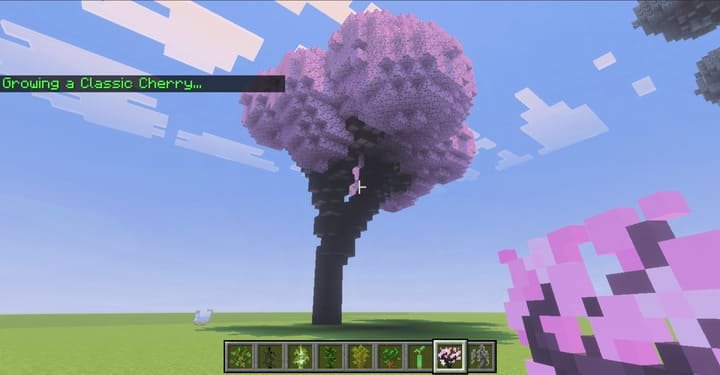
Once you've selected the option you want from the menu—from a small bush to a giant tree—simply click the corresponding button. You'll be able to watch the tree grow procedurally right before your eyes, branch by branch. The updated version of the add-on features improved, smoother, and more beautiful growth animations, turning this process into a real spectacle.
Endless variety and uniqueness
This add-on doesn't just add a few new tree models. It uses a complex algorithm to ensure that every tree in your world is truly unique.
Procedural Generation Based on Fractals
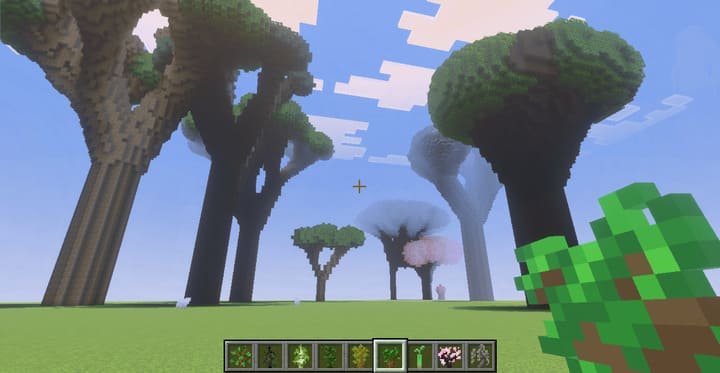
Thanks to the use of a fractal algorithm, no two trees will ever be completely identical. Even if you select the same option from the menu twice, the structure of their branches will differ slightly. This allows you to create incredibly realistic and natural forests, free of the repetitive elements often found in the vanilla Minecraft PE (Bedrock) world.
![]()
More than 10 options for each seedling
Each type of vanilla sapling has more than ten unique growth variations. You can create dense young groves of small trees, mixed forests of medium-sized trees, or place solitary ancient giants throughout the world that will tower over the entire landscape. This vast selection offers limitless possibilities for landscape design in Minecraft PE (Bedrock).
Performance and Compatibility
Despite the scale and complexity of the trees it generates, the add-on was designed with performance and stability in mind so as not to spoil your gaming experience.
Optimization for Low-End Devices
To avoid lag, especially when creating huge trees, the add-on uses a smart generation system. First, it quickly builds the tree’s “skeleton” (trunk and branches), and then places the foliage in separate batches. This ensures smooth growth and minimizes the load on your device. However, the developer warns that growing several very large trees at the same time may cause slight delays in the appearance of foliage.
Compatibility with Realms and servers
The add-on is fully compatible with Survival mode, requires no cheats, and works great in both single-player worlds and on servers and Realms. This makes it the perfect choice for anyone who wants to enhance the visuals of their multiplayer world without sacrificing vanilla gameplay or the ability to earn achievements in Minecraft PE (Bedrock).
![]()
-
Download Add-on: Large Trees [26+]
[536.25 Kb (downloaded: 117)]
Comments (0)
Comment