
How to access the Bedrock server from Minecraft Java
![How to access the Bedrock server from Minecraft Java Minecraft PE / Bedrock [xfgiven_vers]](/uploads/posts/2025-12/hq720-2.webp)
- Review
- Help/Install
-
Many Minecraft Java Edition players want to join Bedrock Edition servers, but this is officially impossible due to different communication protocols. However, with the help of the ViaFabricPlus client mod, you can bypass this restriction and play on Minecraft PE (Bedrock) servers directly from the Java version of the game. This guide will explain in detail how to install all the necessary components and configure the connection to any Bedrock server, including the popular Russian server Dygers.
Navigation:■ Установка Java Development Kit (JDK)
■ Disabling browser and antivirus protection
■ Installing Fabric API and ViaFabricPlus
■ Configuring the mod in the game
■ Connecting to the Bedrock server
Установка Java Development Kit (JDK)
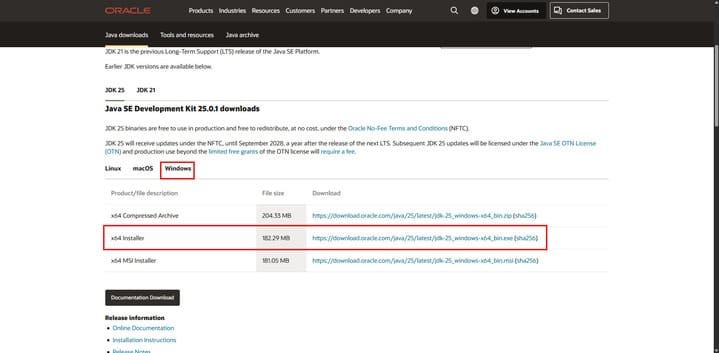
The first step for mods to work correctly on the Fabric platform is to install the Java Development Kit (JDK) — this is not the Minecraft Java Edition game itself, but the software required to run Java applications. Go to the official Oracle website using the link at the end of this paragraph. On the download page, select JDK 25 and your operating system.
For Windows users, it is recommended to download the executable file with the .exe extension (x64 Installer). After downloading, run the installer, follow the instructions of the installation wizard, and do not change anything in the default settings — just click the "Next" button at each stage. Once the installation is complete, the JDK will be ready to use, and you can proceed to the next step in Minecraft PE (Bedrock).
![]()
➡️ Скачать Java Development Kit (JDK 25) ⬅️
Установка Fabric Loader
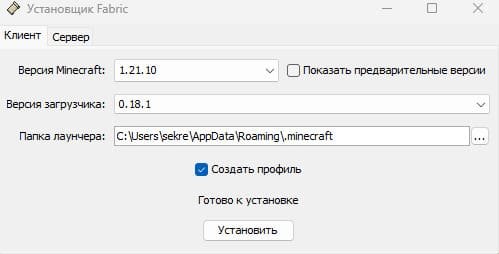
Fabric Loader is a modification loader for Minecraft Java Edition that allows you to run mods and plugins. Download the Fabric installer from the link at the end of this paragraph. After downloading, run the installer file — a window with settings will open. It is important to select the correct parameters here: in the "Minecraft Version" field, select 1.21.10 (or the latest stable version compatible with ViaFabricPlus), and in the "Loader Version" field, leave the latest available version, for example, 0.18.1.
Ensure that "Client" is selected and that the installation path points to the standard Minecraft folder in Minecraft PE (Bedrock). Check the "Create profile" box to automatically add Fabric to the game launcher. Click the "Install" button and wait for the process to complete — a message saying "Ready to install" will appear, after which you can close the installer window.
![]()
Скачать Fabric Loader
Disabling browser and antivirus protection
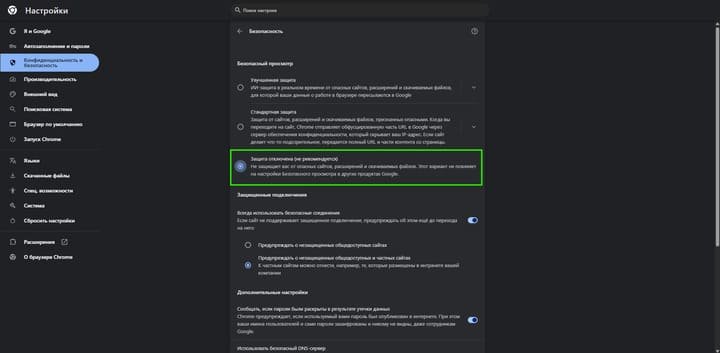
To successfully install mods, you need to temporarily disable security mechanisms that may block file downloads or falsely identify them as threats. In Google Chrome, open Settings, go to Privacy and security, then Security. Here, select the "Protection disabled (not recommended)" option — this will allow you to download mod files without any restrictions.
Disabling antivirus software
Also, pause all antivirus programs installed on your computer in Minecraft PE (Bedrock). If you are using Windows, additionally open "Windows Security" via the Start menu, go to the "Virus & threat protection" section, and temporarily disable real-time protection. After completing the installation of mods, be sure to return all security settings to their previous state.
![]()
Installing Fabric API and ViaFabricPlus
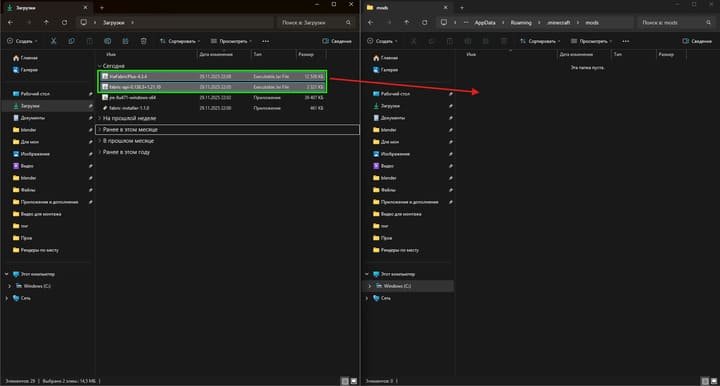
Now you need to install two key components: Fabric API, a library that enables mods to work on the Fabric platform, and the ViaFabricPlus client mod itself, which emulates the Bedrock Edition protocol. Download both files using the links at the end of this paragraph. After downloading, open Windows Explorer and navigate to the Minecraft mods folder.
Installing mod components
A quick way to get there is to press the Win + R key combination, enter the command
%appdata%\.minecraft\modsin the window that appears, and press Enter. If the "mods" folder does not exist, create it manually for the mod to work on Minecraft PE (Bedrock). Copy or move both downloaded files (Fabric API and ViaFabricPlus) to this folder. Make sure the files have the .jar extension — if they are packed in .zip archives, unpack them first. After placing the files in the mods folder, you can proceed to launch the game.![]()
Download Fabric API and ViaFabricPlus
Configuring the mod in the game
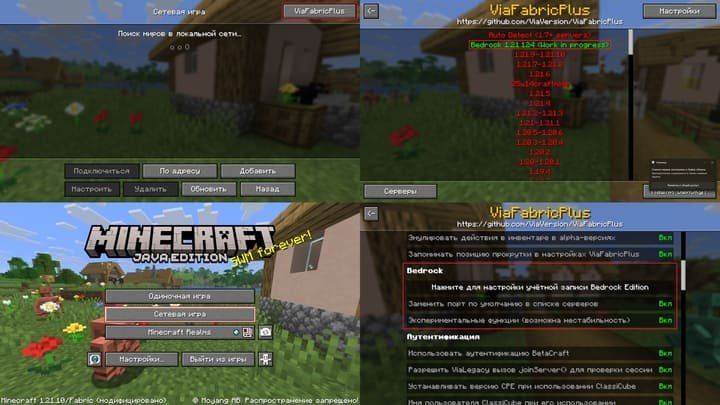
Launch the Minecraft Java Edition launcher and find the newly created profile with Fabric in the list of profiles — it should be called something like "fabric-loader-1.21.10". Select this profile and click "Play." After the game loads, you will find yourself in the main menu. Click the "Multiplayer" button to go to the server list. A new "ViaFabricPlus" button will appear in the upper right corner of the screen — click on it to open the mod settings. In the menu that opens, find the version selection section and select "Bedrock 1.21.124 (Work in progress)" or a similar current version of Minecraft PE (Bedrock).
Link your Xbox account
Then go to the "Settings" section within the ViaFabricPlus menu. Here you can link your Bedrock Edition account by clicking the appropriate button. This is an optional step, but some servers require authentication via Xbox Live — in this case, follow the instructions on the screen to authorize. You can also enable experimental features in the settings if necessary for your server, but this may cause instability.
![]()
Connecting to the Bedrock server
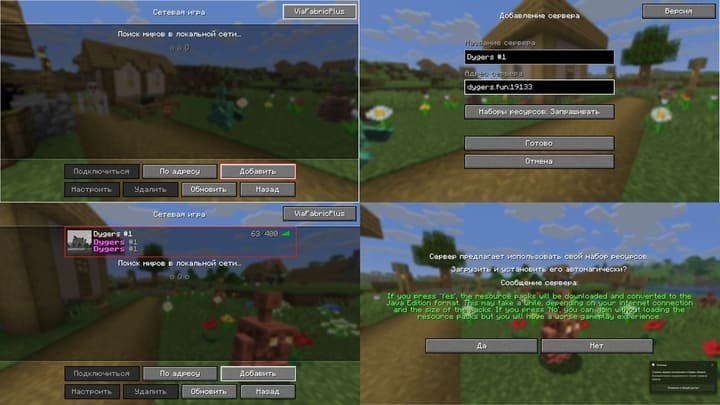
Return to the "Network Game" menu by pressing the back arrow or the corresponding button to exit ViaFabricPlus settings. Now add a new server by pressing the "Add" button at the bottom of the screen. In the window that opens, enter the server name in the "Server Name" field—for example, "Dygers #1" or any other name of your choice. In the "Server Address" field, enter the IP address and port in the format IP:port. For the Dygers server, enter dygers.fun:19133. Please note that the port is mandatory for Bedrock servers and is usually different from the standard Java port (25565) in Minecraft PE (Bedrock).
Server resource kits
In the "Resource Packs" parameter, select either "Ask" (so that the game asks you to download server resource packs) or "On" (for automatic downloading). After filling in all the fields, click the "Done" button. The server will appear in the list of available servers. Click on it to connect.
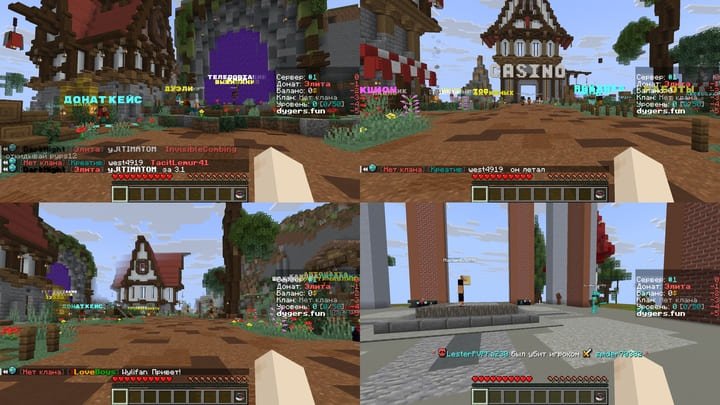
If you selected the "Ask" option for resource packs, a pop-up window will appear offering to download and convert them to Java Edition format — click "Yes." The conversion process may take some time depending on the size of the packs and your internet connection speed. After successfully connecting, you will be taken to the server and see a welcome message. Register or log in by following the server instructions and enjoy playing on the Bedrock server with Java Edition!
![]()
Important compatibility information
Despite the functionality of the ViaFabricPlus mod, it is important to understand that due to technical limitations and differences between the Java and Bedrock Edition protocols, not all Minecraft PE (Bedrock) server features will work correctly. Some server plugins that use specific Bedrock API features may not recognize the Java client or may not work correctly. You may encounter visual glitches, missing blocks or items, animation issues, or user interface problems.
What works without problems
However, the basic mechanics of the game—survival, building, PvP, chat communication—work stably, allowing you to play fully on most popular servers. If you encounter serious problems, try updating ViaFabricPlus to the latest version or contact the mod developers for support.
Why should you play on Dygers?
The Dygers server (dygers.fun:19133) is one of the best Russian-language servers for Minecraft PE (Bedrock) with an active community, regular updates, and a variety of game modes. Here you will find classic survival modes, PvP arenas, mini-games, donation cases, and clans. The server administration is constantly working to improve performance and add new content.
Thanks to ViaFabricPlus, you can join this server directly from Java Edition and enjoy all its benefits. Register, develop, build, fight, and communicate with thousands of players who have already chosen Dygers as their home in the world of Minecraft!
![]()
-
Comments (0)
Comment