
Mod: Flying Inventory [26+]
![Mod: Flying Inventory [26+] Minecraft PE / Bedrock [xfgiven_vers]](/uploads/posts/2026-06/1781539103_floating-containers.jpg)
- Review
- Help/Install
-
The Floating Containers mod for Minecraft PE (Bedrock) adds interactive floating screens to all chests, barrels, and shulkers in your world. To activate a container, simply crouch and interact with the desired storage unit. An inventory window will appear above it, allowing you to sort, move, and retrieve items with a single click.
Navigation:■ Features of the "Flying Inventory" mod
■ Moving Containers and Optimization
Features of the "Flying Inventory" mod
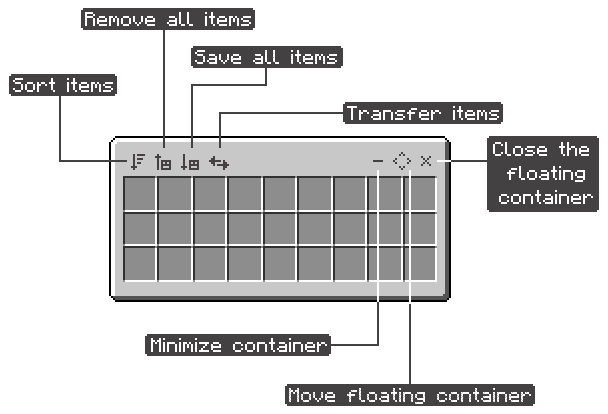
The Floating Interface offers powerful organizational tools. You can use the quick-sort buttons to stack all identical items or sort them alphabetically in Minecraft PE (Bedrock). You can also instantly move all items into your inventory or, conversely, unload everything from your pockets into a chest.
![]()
Container Movement and Optimization
The mod supports smart filters: if you interact with the buttons while holding down the crouch key, the system will move only those item types that you already have in your hands or in the Minecraft PE (Bedrock) container itself. Additionally, you can transfer all resources directly from one floating inventory to another (the "Transfer" feature).
Position and Lag Settings
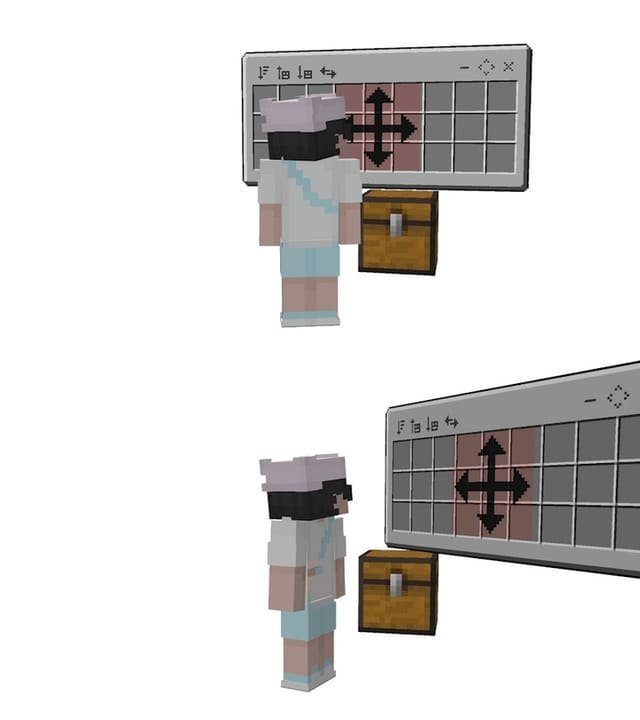
You can move the floating container in any direction (up to 32 blocks away from the chest) to customize the interface for your base in Minecraft PE (Bedrock). If there are too many windows on the screen, you can minimize them. The developer recommends not opening more than three windows at a time on low-end phones to avoid lag. The mod is fully compatible with multiplayer and achievements.
![]()
-
Download Mod: Flying Inventory [26+]
[52.73 Kb (downloaded: 128)]
Comments (0)
Comment