
Mod: Create region [1.21; 26+]
![Mod: Create region [1.21; 26+] Minecraft PE / Bedrock [xfgiven_vers]](/uploads/posts/2025-12/1766176156_land-claims.jpg)
- Review
- Help/Install
-
The Land Claims mod adds a functional tool to Minecraft PE (Bedrock) for creating and configuring private regions. This is an ideal solution for multiplayer servers or collaborative play with friends, where it is important to protect your property from griefers.
Upon entering the world, each player receives a special item called a "Land Claimer," which can be used to mark the boundaries of their plot by simply selecting two corners. The system visually displays the boundaries of the private area, making the process intuitive even for beginners.
Navigation:■ Features of the Create Region mod
Features of the Create Region mod
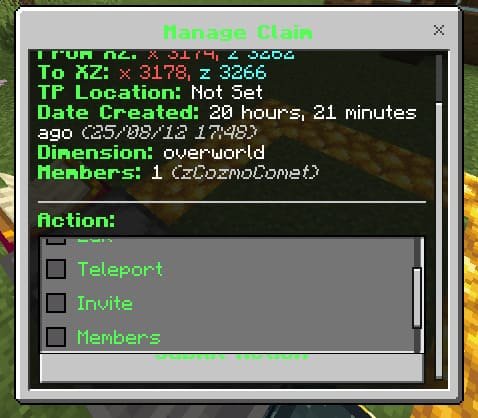
The add-on gives the region owner complete control over guest permissions. You can allow or prohibit building, destroying blocks, using mechanisms (doors, buttons), opening chests, and even PvP. The control menu is accessed using the same "Land Claimer" item and allows you to add friends to your private group, teleport to your plot, or delete it.
An important detail is the "Combat Locking" system: during combat, the private menu is locked for 15 seconds so that players cannot use teleportation home to avoid combat in Minecraft PE (Bedrock).
![]()
Management and Settings
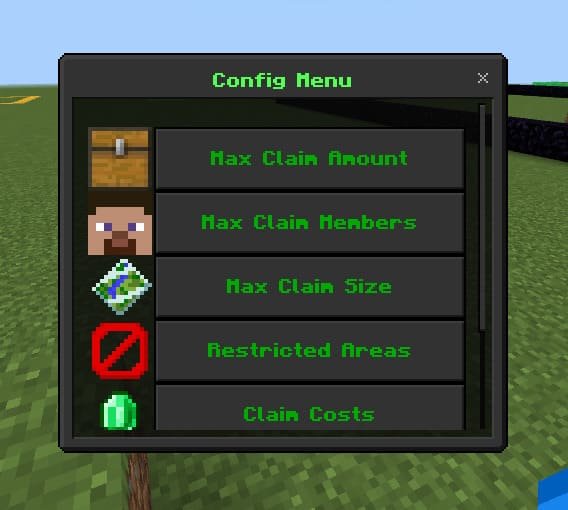
Server administrators have extensive configuration options. Using special commands, they can set limits on the number of private rooms per player, maximum plot sizes, and the cost of creating a region (in items or game currency). It is also possible to declare certain areas off-limits for private rooms.
Administrators can view and manage logs for all regions, which simplifies moderation. To use the mod, you must enable the experimental Beta-API option in the Minecraft PE (Bedrock) world settings.
![]()
-
Download Mod: Create region [1.21; 26+]
[530.92 Kb (downloaded: 1112)]
Comments (0)
Comment