
Resource pack: Emoji menu [26+]
![Resource pack: Emoji menu [26+] Minecraft PE / Bedrock [xfgiven_vers]](/uploads/posts/2026-03/1749896441_emojis.jpg)
- Review
- Help/Install
-
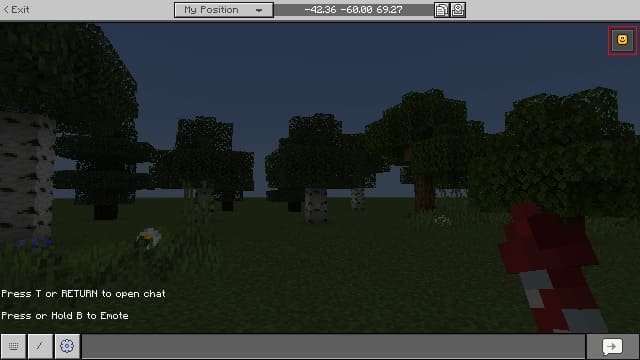
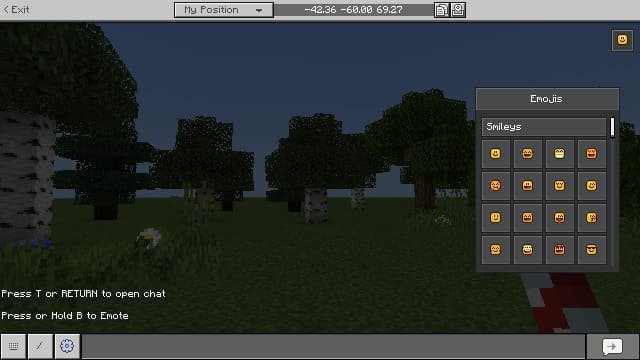
Emojis! is a visual resource pack for Minecraft PE (Bedrock) that adds a pop-up emoji menu directly to the in-game chat. You can use over 100 emojis by clicking the buttons in the chat, without having to enter commands or install third-party mods.
Navigation:■ Features of the Emoji Menu Resource Pack
■ Compatibility and known bugs
Features of the Emoji Menu Resource Pack
Unlike other resources, this pack works without a behavioral mod, which means it doesn’t disable achievements. You get a modern panel with 116 emojis built right into the Minecraft PE (Bedrock) chat. The interface is clean, lightweight, and compatible with most devices.
![]()
How to use emojis in chat
Open the chat, tap the emoji button—a pop-up menu with a selection of emojis will appear. Tap the one you want, and it will automatically be inserted into the Minecraft PE (Bedrock) text box. For optimal performance on mobile devices, we recommend first tapping outside the text box and then selecting the emoji.
![]()
Compatibility and Known Issues
This pack works perfectly with other Minecraft texture packs that modify the chat interface. However, on mobile devices, the buttons may disappear when entering commands, and the chat panel may shift when scrolling through emojis. All of these issues are known and are being gradually fixed.
-
Download Resource pack: Emoji menu [26+]
[123.87 Kb (downloaded: 131)]
Comments (0)
Comment